



You have a website.
Someone is visiting her.
But… what’s actually going on there?
- Where are the recipients coming from?
- Which offer pages do they view most often?
- Does someone fill out a contact form or make a purchase?
- At what stage do users leave the site - and why?
If you don’t have analytical tools, your website works… or doesn’t work – you have no control over it.
The good news is that there are several free website analytics tools, which allow you to see what’s really happening on your website.
They help you make better business decisions, and often save a lot of money on marketing.
Importantly, these are free, safe tools recommended by the largest online platforms, such as Google, Meta and LinkedIn. This is why they are now the standard in website traffic analysis.
Below you will find the most important ones and an explanation of why it is worth installing them even if you have no technical knowledge of data analytics.
Google Analytics 4 – see what users do on your website
If your website were a stationary store, Google Analytics would be a system that shows:
- how many people entered the store,
- where did they come from
- which shelves they looked at the longest,
- did anyone buy anything.
Google Analytics 4 (GA4)

With this tool you can check, among others:
- how many people visit your website,
- where do users come from (Google search engine, ads, social media),
- which subpages are most frequently visited,
- how much time they spend on the website,
- whether they perform important actions, e.g. submit a contact form or make a purchase,
- at what stage users leave the website (e.g. when filling out a form or before finalizing a purchase).
Why is it important?
Imagine that you invest in online advertising. Without analytics, you only know what you paid for them – or maybe how many people saw them.
But you don’t know:
- how many people actually visited the website,
- how many people were interested in your offer,
- how many people became customers,
- how many people left after a few seconds because something was unclear or unconvincing.
Google Analytics allows you to see this entire process.
Thanks to this you can check:
- which marketing activities really bring customers,
- which only generate traffic without any sales effect.
In practice, this means one thing: significant reduction in customer acquisition costs.
How to install Google Analytics on your website?
Are you having problems? Contact us, we will help.

Google Search Console – check how your website looks in Google
The second very important tool is Google Search Console.
This tool shows whether and how your website appears in the Google search engine.
Imagine you type a phrase into Google, e.g.:
- "logistics company Warsaw"
- "office furniture manufacturer"
- "automation of processes in the company"
A list of search results appears on the screen.
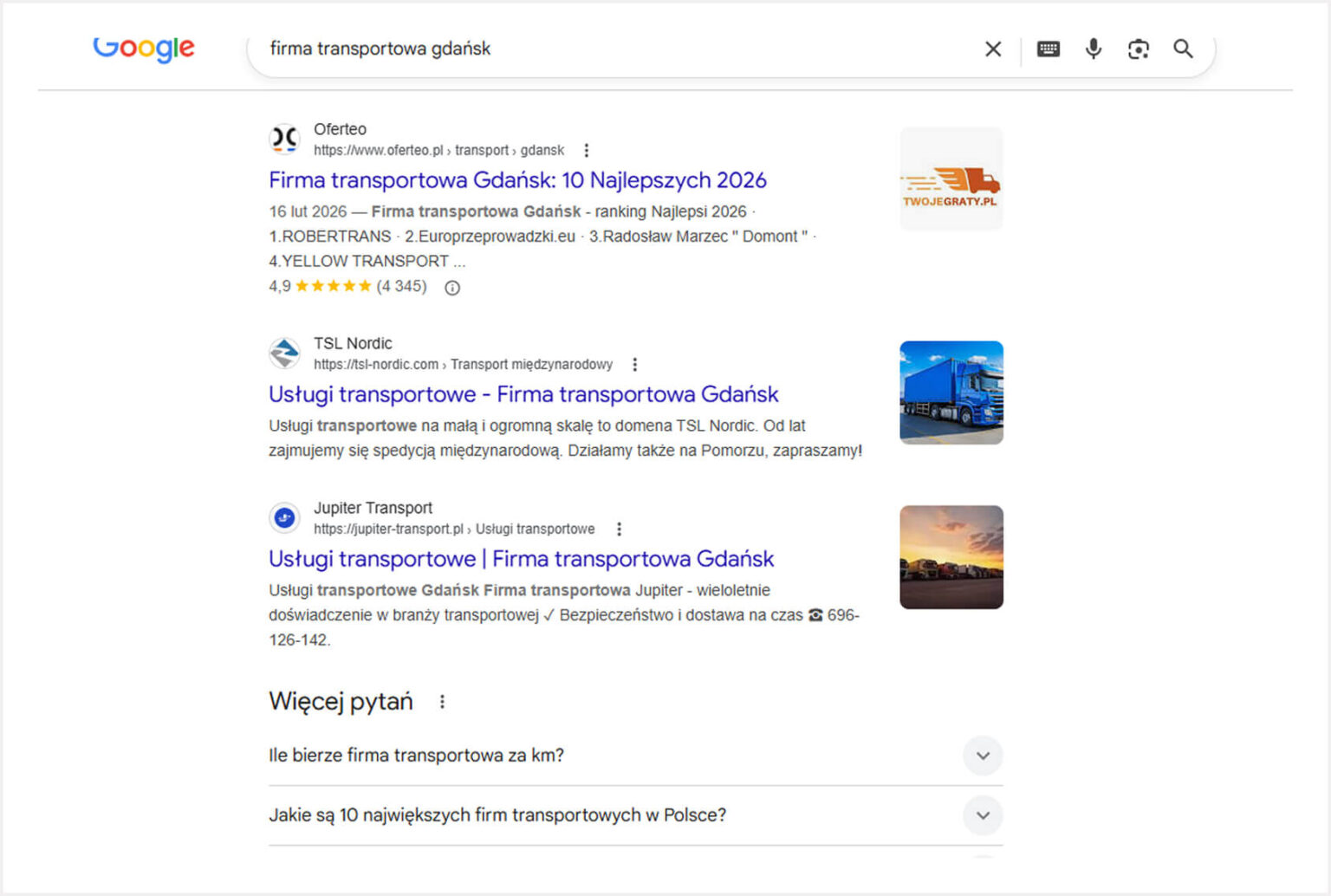
Google Search Console allows you to check, among others:
- does your website appear in such search results,
- where is it visible,
- how many people clicked on your result,
- what queries users enter before they land on your website.
Why is it important?
If your website doesn’t appear high in Google, potential customers are most likely to they just won’t see it.
Google Search Console allows you to check:
- is your website visible in the search engine,
- which content attracts users,
- whether there are technical problems that make it difficult to display.
This is one of the most important tools for any company that wants to acquire customers from the Internet.
Do you want customers to visit your offer page much more often?
Meta pixel – check if Facebook and Instagram ads are working
If you run ads on Facebook or Instagram, installing a Meta pixel is an absolute must.
This is a small piece of code that allows you to check what users do after clicking on the ad.
Thanks to this, you can see, among other things:
- how many people visited the website from the ad,
- how many people sent the form,
- how many people made a purchase,
- how many people visited the website but left it after a while.
Why is it important?
Without a pixel, meta advertising on Facebook or Instagram works a bit like handing out leaflets on the street.
You know how many people got the leaflet, but you don’t know who actually came to the store and what they did next.
With the Meta pixel you can:
- accurately measure advertising effectiveness,
- check which campaigns bring customers,
- retarget ads to people who visited your website (e.g. viewed the offer but did not buy),
- reach with advertising to people similar to those who have already become your customers.
All this makes advertising much more effective and cheaper.
LinkedIn Insight Tag – analytics for companies and business clients
If your customers are companies or business clients (B2B), is a very important tool LinkedIn Insight Tag.
This is an analytical tool for LinkedIn ads that allows you to see what happens when you click on an ad.
Thanks to it, you can see, among others:
- who visited your website from a LinkedIn ad,
- what companies are interested in your offer,
- which ads generate the best website traffic,
- what actions users perform after entering the website - e.g. whether they fill out the contact form or leave after a few seconds.
Why is it important?
LinkedIn is one of the most important marketing channels for B2B companies. If you run ads without connected analytics, you burn through your budget and lose some money.
Insight Tag allows you to see, among other things:
- what industries visitors come from,
- what positions users hold,
- whether your campaigns reach the right people.
Some of this information can be seen in the LinkedIn advertising panel, but Insight Tag allows you to combine ad data with what the user has already done on your website.
This allows you to better assess whether your campaigns are actually attracting potential customers.
Will website analytics really save me money? I don't want to waste time.
Many companies treat a website as a business card.
Meanwhile, well-configured analytics turns the website into a business tool that allows:
- check marketing effectiveness,
- analyze user behavior,
- make decisions based on data.
Instead of guessing, you can just see what really works.
With these tools you can check:
- which advertising attracts customers (and which is an unnecessary expense),
- which subpage generates quotation requests,
- where users abandon the purchase.
Importantly, all the tools described above are:
- free,
- safe,
- recommended by Google, Meta and LinkedIn.
That’s why they are here today the most frequently used data analysis tools on websites around the world.
Installing basic analytics is one of the simplest steps you can take to make your website work towards real business results.
Because before you increase your marketing budget, it’s worth checking one thing first:
Does your website really attract customers or does it just hang around?
Are you looking for a specialist who will properly connect all this analytics for you?
Contact us, we have hundreds of successful installations behind us.

Author

Milena Konieczna


Get in touch and let’s see how we can help you!
Join the ranks of our satisfied customers.




